Review and edit the job draft
Review the job details, description and stages of a draft role before you tell Tandem to make it live.
Drafts aren't public, so you can change anything without candidates seeing it.
What to check
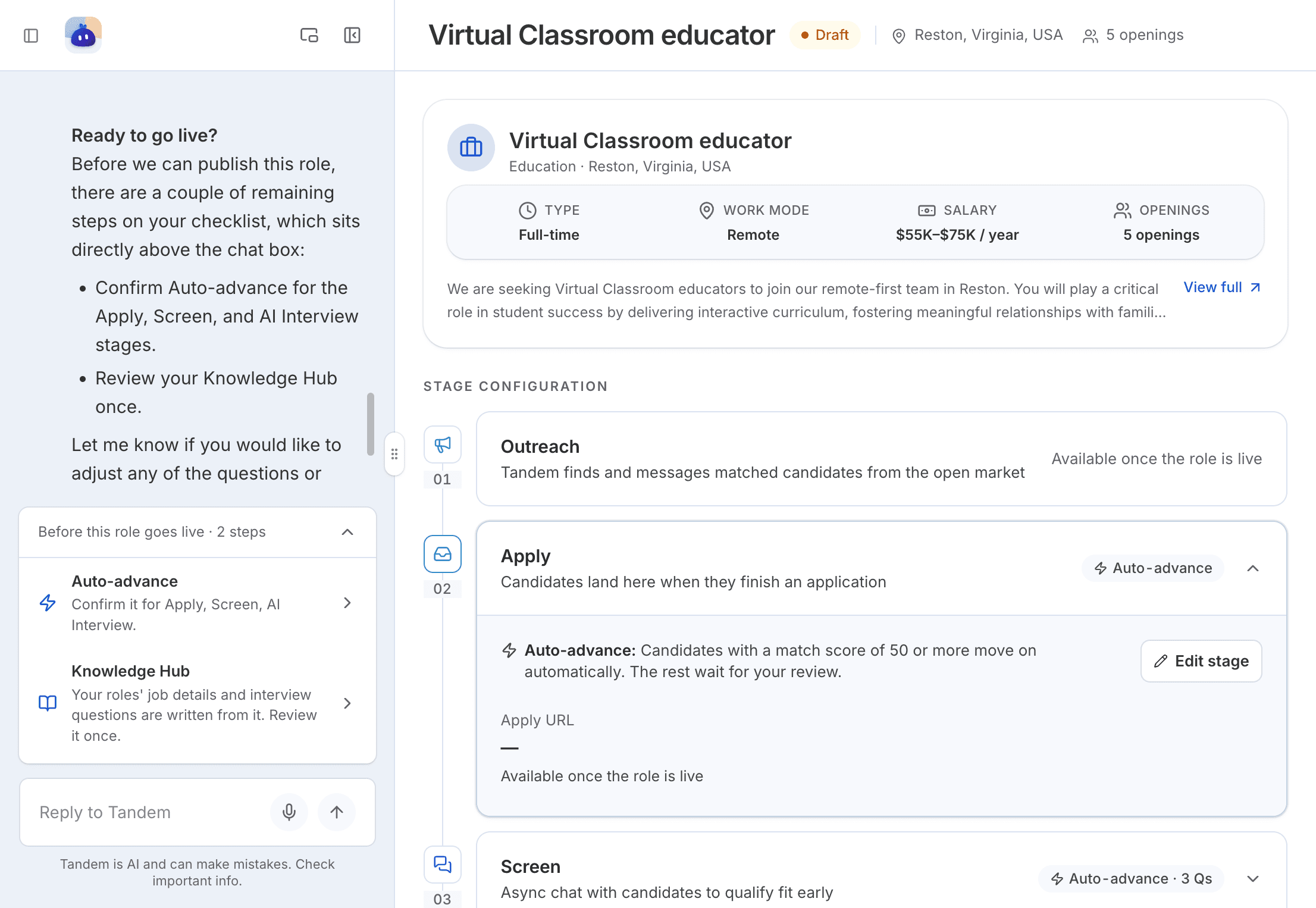
Open Roles, find the role under Drafts, and click Continue setup. Check:
- Job details: type, work mode, salary and openings.
- Job description: click
View fullto read it all. - Stage configuration: each stage's questions and auto-advance.
Tandem also sums up the draft in the chat: what came from you, what it assumed, the auto-advance bars it suggests, and anything that blocks going live.
Tip
Read the list of what Tandem assumed. That's where a wrong salary or work mode usually hides.
Make changes
The simplest way is to ask Tandem in the role's chat, for example: "Add a question about weekend availability to the screening."
You can also change the stages yourself in Hiring flow:
Auto-advance: on or off, per stage.Remove stage: drop any stage exceptApply.Edit stage: change questions, messages, channels or interview rounds.
Which stages a role has is fixed once it starts going live. Stage settings can still be edited after that.
When it's ready
Tell Tandem make the role live.
Related: Go live, pause or close a role